

How To Create Online Personal Training Program
Online personal training is now more relevant than ever. With the vast array of technological options and virtual training applications available, you can pivot to an online personal training business in a few relatively easy steps. This guide will function as your cheat sheet for a (hopefully) pain-free process towards transitioning to a virtual training dynamic for your business. If you are interested in becoming a professional virtual coach, look no further than the NASM specialization course on virtual training. Follow the link to earn some CEUs and get some great content! With that said, let's jump right in! To navigate to each section, follow the jump links below: I became a NASM Certified Personal Trainer in 2001. While in college, I worked at the on-campus gym, followed by an internship at a local gym in Houston. I continued training there after graduation. With seven years of experience under my belt, I left the gym and started training clients in-home. As we all know, it's tragic to lose clients to a move or an inevitable change of availability. When one of my clients was relocating in 2014, we took our training sessions online to continue all of the hard work we'd done together. This marked the inception of my online training business. Now, six years later, I've streamlined the process, and I'm ready to share my knowledge with others. Like any professional transition, there have been growing pains and many unforeseen obstacles. Still, overall this has been an incredible career move for me and a valuable service for my clients. To start your online personal training business, you first need to pick out the right technology, device, and fitness applications to drive your training sessions. Next you should map out your virtual workspace. Lastly, you need to make sure you have the needed fitness equipment to train your clients effectively. Let's break down each facet of starting your business below - starting with technology, moving through your work space dimensions, the equipment you'll need, and ending with lighting and workout environment factors! The thought of taking your business online to offer virtual training services may be incredibly overwhelming at first. However, don't let the fear of the unknown stop you from making a positive step forward into the game-changing world of online personal training. I've spent many years refining the process to make virtual services seamless and valuable for my clients as well as lucrative and efficient for myself. I've taken the time to break down my best practices in a way that will show you this can be a smooth and very profitable business move for you. First things first, I'm going to teach you how to set-up your virtual training space with confidence. To set-up your virtual training space, you'll need two devices: While you can train your clients virtually from anywhere (I've even done this while out of town), it's nice to have a dedicated home-base that allows you to be as organized and efficient as possible. Before selecting a training space in your home, ask yourself the following questions: Make sure to have plenty of space between your camera and the demo area. In my virtual training space, I have both devices on my desk with six feet of open floor behind me. Make sure all equipment is off to the side, so you don't have to leave the room to retrieve it. Your client's time is precious (and paid for). With that in mind, your preparedness is critical. If you wouldn't walk out of the gym during a session, don't do it at home either. Professionalism is key. As a fitness professional, you know that great workouts are possible with little to no equipment. Ideally, your client has at least a set of dumbbells. I typically recommend that each client has three sets of dumbbells. Weight requirements will vary from client to client, but I follow this general guideline. One set should be light (3-5lbs), one medium (8-10lbs), and one heavy (15-20lbs).The weight selection will depend on many factors, including budget, current strength, and future goals. If a client has more equipment (and most eventually choose to purchase more), you need to have a comparable item to demonstrate proper usage. I recommend investing in the following items for your virtual training space: Anything that fits in your space and is within your budget is a good call! Chances are you already have a wide range of dumbbells for your personal use, but if not, don't worry about matching your client's exact weight. I use bright orange 5-pound weights to demonstrate for my clients; bright colors make it easier for clients to see the movements. Depending on your background, a black or gray weight could get lost on the camera. Maximizing visibility will allow you to train as seamlessly as possible. This brings us to our next point, lighting. Ample lighting (either natural or artificial) is crucial when working with clients online. Have you ever taken a photo in dim light and noticed that it's grainy and pixelated? Web cameras work the same way. You want your clients to have as much clarity as possible during their session, making the experience as close to in-person as you can. If windows are behind you while you work, you will appear dark and shadowy on camera. Your client won't be able to see you very well, and you may come across as unprofessional or unprepared. Based on where my desk has to be in my space, the windows are behind me. To overcome this problem, I purchased decorative blackout shades and made sure to close them before each session begins. Also, I bought an inexpensive ring light that illuminates my face (much like window light) so clients can see every move I make. The ring light is optional, so if you're unable to purchase one right now, don't worry. Just consider picking one up when you can. Also, based on your lighting situation, you may not need one at all. Remember, your client's time is precious and paid for. It's essential to provide the most professional service possible for your client - making their investment with you well worth the spend. Consider all of the ways you can make your personal training space as distraction-free as possible. A noisy background is a distracting one. Barking dogs, crying babies, oven timers going off, and notifications from your phone can all take away from the value of a client's time with you. While some of these things are bound to happen, minimize the possibility where you can. I've often hired a babysitter to come over and attend to the children while I work with a client online. If that's not possible, I've reserved my kids' screen time to coincide with my client appointments for the day. I know that I need as little background noise as possible. Because my dogs love to greet delivery drivers at the door (only a few steps from my training room), they spend their time in another room when I'm training a client. I've also recently added curtains to the doorway of my training room and keep them closed during online training sessions. Closed curtains are a visual indicator to my family that I'm not available and can't be interrupted. Many personal trainers (including myself) have capitalized on pre-written, packaged, and branded workout programs. These programs may be general or geared toward a specific demographic (new moms, senior citizens, or those who want to workout at home with a little guidance). Often, these programs are available on DVD or via an online download for one price. These products are a great option to help your business generate passive income; however, pre-written programs are vastly different from the virtual training experience. As a virtual trainer, you get to work with clients from a very specific vantage point. You will get to know your client, learn about his or her individual goals, and develop a program that is strategic. Virtual training is less of a one-size-fits-all approach, and more of a tailored service meant to add value and strengthen relationships. See also: This Mini Course on How to Build the Best At-Home Workout A great approach is to utilize both pre-written programs and virtual training. This can be done pretty easily with the NASM edge app. Because you can utilize sample programs and exercises that come freely with the app, you can provide tried-and-tested programs for clients on days you don't provide a 100% live, virtual training session. This means you balance out training sessions with a mixture of live workouts and routines that clients can do whenever they are ready. You can then measure their fitness results through the EDGE dashboard. A pretty useful tool! Listen to some additional tips on how I implement online training programming in the following video: Much like any service you offer, online training isn't without some challenges. I want to share some benefits and drawbacks to think about as you consider adding virtual training to your scope of service. Now for the part that makes everyone cringe, money! I think every entrepreneur on earth has questioned their value at one time or another. Am I worth that much? Yes, yes, you are! You are providing a valuable professional service that is designed to change lives. Be confident in your pricing, and stick to it! You aren't a discount store, so don't even think about running blue light specials. To determine your pricing for virtual sessions, I recommend charging 20-25% LESS than you would charge the same client for a similar in-person training session. Example: If you charge Sam $100 for an in-person training session, you will charge him $75-$80 for a virtual session. No matter your actual rate, just be consistent. Don't undervalue yourself, and be sure to charge everyone the same Virtual training is all about being hands-off, right? For the sake of automation and efficiency, I have an e-commerce system in place that allows clients to purchase online training sessions via my website. Some clients aren't comfortable with making web purchases, and that's ok. For those clients, I provide other payment options, such as a branded Paypal invoice. I like to streamline as much as possible for the client. Many of my clients prefer to receive an invoice in their inbox rather than purchasing via the web. I keep both options available to accommodate my clients. I limit payment methods for the sake of keeping things streamlined and organized. Therefore, I prefer not to use external apps such as Venmo, Zelle, Cash App, etc. Consistent and trackable accounting is vital to run an efficient online business; and, it's especially important at tax time! If your client does not budge on payment methods (some people have had a bad experience and may refuse particular payment processors), you may consider making an exception. In that rare circumstance, it's better to collect payment by other means than no payment at all. Here's a great resource for collecting online payments, if you wanted some additional info! Just as you'd keep a file for each client at the gym, you need to do that for your virtual clients as well. While software specific to personal trainers does exist, it's not at all necessary to run your virtual training business. You can very easily run your business using free Google Drive apps (such as docs and sheets) or using Microsoft office (such as Word and Excel). The beautiful thing about Google Drive is, it syncs across all of your devices, and files can be shared with your clients. If you're not familiar with Google drive, don't worry, you can learn it quickly. If you've ever used Microsoft Office, this will be no sweat for you. Google Drive is a fantastic cloud-based solution that adds to the seamlessness of running a business online. Each client has his or her own Google document within my Google Drive account. That individual document contains the following client-specific information: Even though your client will be working with you remotely, obtaining the correct forms and signatures is of utmost importance. These documents will protect you and your client should anything go awry during your virtual sessions. I have both required and optional forms, and I'll break those down for you below. These forms can be emailed to your client. Instruct them to send the completed forms back and then file away either hard copies or online. Even if you keep paper copies, it's a good idea to add scanned copies to each client's personal (e.g., Google) folder as well. Make sure all forms are complete before their first training session with you. No matter how good a friend the client may be, always complete the forms. To streamline this process for my business, I host all forms on my website. When I receive a new client, I simply forward them one URL, and they have access to printable versions of each form. Most clients are willing to take circumference measurements, but not all. For this reason, I also list measurements as optional. I have a video on my website that demonstrates how to take proper measurements. These numbers are super helpful as you move forward with this client. They can be used as positive reinforcement to show a client how far he or she has come. I also add "bodyweight" to this section, though less emphasis is placed on weight. I'm a firm believer that evidence of visual progress makes one more likely to reach his or her goals. For this reason, I strongly encourage clients to take before photos. On my website, I show examples of how pictures are to be taken. I also provide a way to submit the photos. I don't require these photos, but strongly encourage each client to take this step in the process. Finally, you don't need to reinvent the wheel on all of these items mentioned above. A quick internet search will lead you to many templates and examples of forms that you can use to create something for your clients. You can also hire an attorney to create these forms for you. Our very own NASM has many of these resources available already to their Certified Personal Trainers. Also, be sure to add your logo to the top of all documentation for professionalism and brand awareness. If you're still on the fence about how virtual training may work in your business, I encourage you to implement virtual services while continuing to see in-person clients as well. This way, you can see if it's something that will work for you and your clients without giving up all of your in-person work. If you are interested, the UK branch of NASM (Premier Global NASM) offers great resources and courses that you can take 100% online to help you transition to online personal training as well. For another great resource from NASM - that's free by the way! - check out the NASM virtual coaching mini-course for additional content. If you need additional help getting started, please visit the "fitness business coaching" page on my website at keridonfitness.com for more information.
My Introduction to the World of Virtual Training
How to Start Your Online Personal Training Business
Technology you will need for your online training business
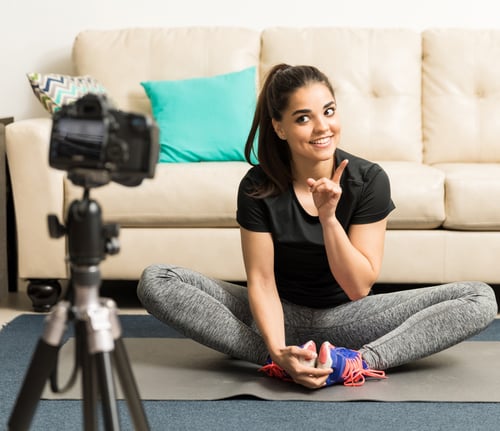
Setting up your virtual training space
fitness equipment considerations for online personal training

Lighting for Your Training Space
Environment is Key for your workout space!
Virtual Training vs. Pre-Written Programs
Balancing both virtual training and prewritten programs!
Benefits and Drawbacks of Online Personal Training
Benefits:
Drawbacks:
How much should you charge as an online personal trainer?

Billing Tips for online Personal trainers
Billing Methods and payment systems
Things to keep in mind about payment:
How to Prepare Client Documentation
Virtual Client Files
Legal and Supporting Documents for virtual training
Required legal Forms for online personal training
Optional documents for online personal training
Measurements
Before Photos
DOn't reinvent the wheel!
concluding thoughts + Additional resources
How To Create Online Personal Training Program
Source: https://blog.nasm.org/how-to-build-an-online-personal-training-business
Posted by: rachelfloore.blogspot.com
0 Response to "How To Create Online Personal Training Program"
Post a Comment